
텐의 개발 블로그
[Spring Legacy] 스프링 레거시에서 스프링 시큐리티 적용하기 본문
이번 포스팅에서는 Spring 레거시 + mybatis 환경에서 스프링 시큐리티를 셋팅하는 방법에 대해서 얘기를 해보겠습니다.
최근에 스프링 부트 기준으로 스프링 시큐리티를 적용할때는 부트 자체에서 시큐리티를 선택하면 자동으로 넣어지기 때문에 문제가 없었는데 스프링 레거시에서 적용하려고 하니 버전 때문에 에러가 발생하였습니다.
결론만 먼저 말씀드리면 스프링 시큐리티 버전이 스프링 버전보다 높으면 안됩니다. 예를 들어 스프링 버전이 5.7이라면 스프링 시큐리티 버전은 5.7 미만이어야 합니다. 버전 호환성 때문인거 같은데 이 부분만 체크해주시면 크게 어려움 없이 진행이 가능합니다.
참고로 해당 포스팅은 아래의 기준으로 작성 되었습니다.
- jdk version : 1.8
- Spring version : 5.0.7.RELEASE
- Spring Security : 5.0.6.RELEASE
스프링 레거시 기준으로 스프링 시큐리티를 적용하기 위해서는 크게 3가지의 절차가 필요합니다.
- pom.xml에서 의존성 추가
- web.xml에서 필터 추가
- WEB-INF/Spring에 security-context.xml 추가 및 설정파일 작성
ㄴ web.xml의 contextConfigLocation에 security-context가 등록이 되어야함
1. pom.xml에 아래와 같이 의존성 추가
ㄴ Spring 버전이 Spring Security 버전보다 높아야 합니다. (아니면 에러 나요 ㅠ)
<!-- Spring Security -->
    <!-- https://mvnrepository.com/artifact/org.springframework.security/spring-security-web -->
    <dependency>
        <groupId>org.springframework.security</groupId>
        <artifactId>spring-security-web</artifactId>
        <version>5.0.6.RELEASE</version>
    </dependency>

    <!-- https://mvnrepository.com/artifact/org.springframework.security/spring-security-config -->
    <dependency>
        <groupId>org.springframework.security</groupId>
        <artifactId>spring-security-config</artifactId>
        <version>5.0.6.RELEASE</version>
    </dependency>
2. web.xml에 필터 추가 및 contextConfigLocation에 security-context.xml 등록
ㄴ WEB-INF/Spring에 security-context.xml이 추가가 되어야 합니다.
(아래의 3. WEB-INF/Spring에 security-context.xml 추가 참고)
<filter>
    <filter-name>springSecurityFilterChain</filter-name>
    <filter-class>org.springframework.web.filter.DelegatingFilterProxy</filter-class>
</filter>

<filter-mapping>
    <filter-name>springSecurityFilterChain</filter-name>
    <url-pattern>/*</url-pattern>
</filter-mapping>

<!-- The definition of the Root Spring Container shared by all Servlets and Filters -->
<context-param>
    <param-name>contextConfigLocation</param-name>
    <param-value>
    /WEB-INF/spring/root-context.xml
    /WEB-INF/spring/security-context.xml
    </param-value>
</context-param>
3. WEB-INF/Spring에 security-context.xml 추가 및 설정파일 작성

security-context.xml을 추가해줘야 하는데 파일 형식을 Spring Bean Configuration file으로 추가해주시면 됩니다.
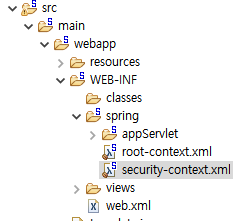
이런식으로 WEB-INF/Spring 아래의 경로에 만들어주시면 됩니다. 경로는 web.xml의 contextConfigLocation에 security-context.xml을 해당 이름의 경로를 기준으로 등록하였기 때문에 맞춰주시면 됩니다.
security-context.xml을 추가하였으면 아래와 같이 설정파일을 작성해주시면 됩니다.
<?xml version="1.0" encoding="UTF-8"?>
<beans:beans xmlns="http://www.springframework.org/schema/security"
    xmlns:beans="http://www.springframework.org/schema/beans"
    xmlns:xsi="http://www.w3.org/2001/XMLSchema-instance"
    xsi:schemaLocation="http://www.springframework.org/schema/beans
    https://www.springframework.org/schema/beans/spring-beans.xsd
    http://www.springframework.org/schema/security
    http://www.springframework.org/schema/security/spring-security.xsd">

    <http auto-config="true" use-expressions="false">
        <intercept-url pattern="/board/**" access="ROLE_USER"/>
    </http>

    <authentication-manager>
        <authentication-provider>
            <user-service>
                <user name="admin" password="{noop}admin" authorities="ROLE_ADMIN" />
                <user name="user" password="{noop}user" authorities="ROLE_USER" />
            </user-service>
        </authentication-provider>
    </authentication-manager>

</beans:beans>
/board/** 로 접근하였을때 ROLE_USER 권한이 있어야 접근이 가능하도록 설정파일을 작성하였고 admin 계정과 user 계정을 각각 "ROLE_ADMIN", "ROLE_USER"라는 권한으로 생성을 해주었습니다.
이렇게 설정파일을 작성하면 /board/**로 접근하였을때 로그인을 요구하게 되고 로그인을 하더라도 ROLE_USER라는 권한이 없으면 페이지가 넘어가지 않습니다.
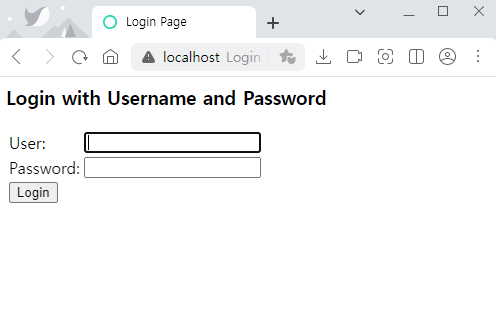
위의 과정을 수행한후에 서버를 실행하고 /board/** 로 접근을 하면 위와 같이 Spring Security에서 기본적으로 제공하는 login이라는 주소의 로그인 페이지로 넘어가게 됩니다.
security-context.xml에서 /board/** 로 접근을 하면 로그인을 요구하고 있기 때문에 로그인 페이지가 호출되는거죠.
로그인 페이지를 따로 작성하지 않더라도 스프링 시큐리티에서 기본적으로 제공하고 있기 때문에 로그인 페이지가 호출됩니다. (이쁘진 않습니다............)
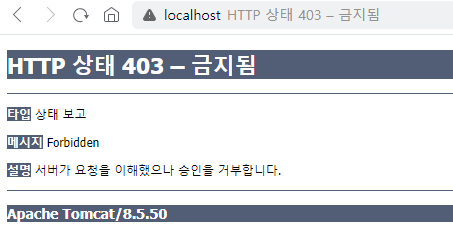
admin 계정으로 접근을 하면 위와 같이 서버가 접근을 거부하여 board/** 에 대한 접근을 거부합니다.
user로 로그인하면 board/**에 대한 주소에 대해서 정상적으로 접근이 가능하게 처리가 됩니다.
'Spring Legacy' 카테고리의 다른 글
| [Spring Legacy] 카카오 책 검색 api 및 Ajax를 이용하여 책 검색하기 (0) | 2023.06.10 |
|---|---|
| [Spring Legacy] 스프링 시큐리티, 현재 로그인한 유저 정보 가져오기 (0) | 2023.06.08 |
| [Spring Legacy] 스프링시큐리티 Post 전송시, 403 금지됨 에러 해결방법 (0) | 2023.06.07 |
| [Spring Legacy] 스프링 시큐리티 로그인,회원가입 처리하기 (0) | 2023.06.02 |


